
Our Blog
Tech Pulse
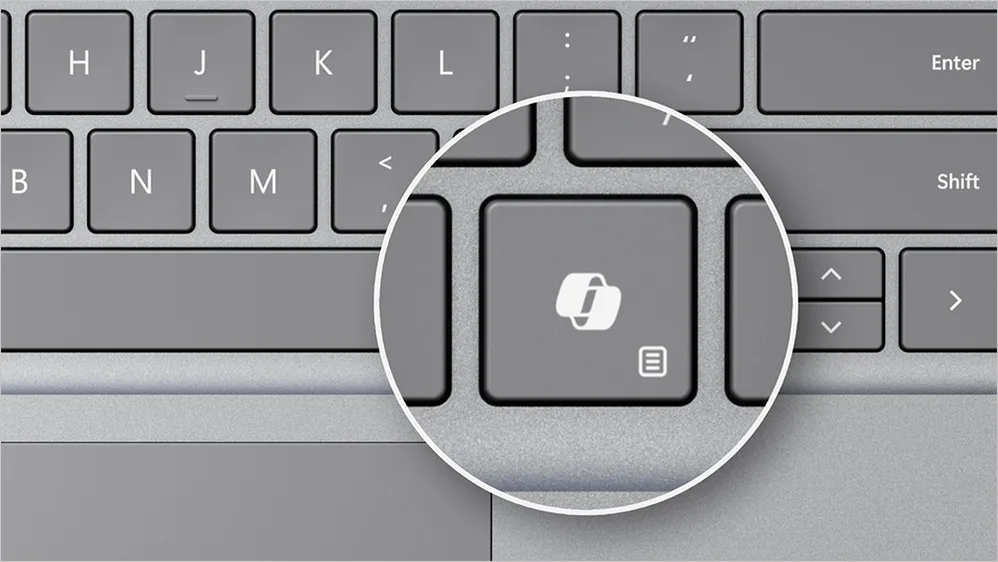
The Microsoft Copilot Key: What It Means for Your Business Devices
🚀 Exciting news from Microsoft! 🎉 The future of technology is here, and AI is taking center stage on Windows 11 PCs. Microsoft has just announced the introduction of a game-changing keyboard with a special Copilot key, granting us access to the incredible world of AI capabilities! 🤖💻
Managing another user’s mail and calendar items – Outlook
There are two ways to work with another person's mailbox in Outlook - folder sharing, and delegate access. Folder sharing allows other users to access one or more folders, however it does not give them the permissions to act on your behalf. For example - this user...
Adding a New Printer or Scanner
Looking to get a new printer or scanner set up? Follow the steps below.. 1. From the search bar at the bottom of the screen type printer. Click on "Printers and scanners" 2. This will bring up the following screen showing the list of printers that are already...
Managing Distribution Lists in Outlook
Distribution lists, also known as distribution groups, are an essential for sending email messages to a group of people. However, managing these lists can be a little confusing, especially if you aren't familiar with Outlook Online. In this article, we'll talk you...
Sharing SharePoint Files
Share Point is used as a secure place to store, organise, share, and access data from any device. Files can be shared with both external and internal users. Ever wondered how to share files securely? This article will guide you on how to share files that are stored in...
Sharing your Outlook Calendar
Follow the steps below to share your calendar with others, so that they are able to view (and edit) your schedule Sharing calendar from Outlook with an Internal user: In the Outlook desktop app, navigate to "Calendar" Right click on the calendar that you wish to...
Delegating Access in Outlook
Delegate permissions Reviewer - The delegate is able to read items in your folders Author - The delegate is able to read and create items. They are also able to change and delete items that have been created by them Editor - The delegate can do everything than an...